


Enterprise
Permitting software for large local governments.

Replacing your permitting system is a big decision. The process takes time, the options can feel endless, and the goal is to come out the other side with a system that actually improves how your department works, not just a new system with the same broken processes as before.
In this guide, we answer the most common questions permitting departments ask when evaluating a new system. You’ll learn what to look for in a permitting solution (and a vendor), how to build your business case, how to navigate procurement and implementation, and more.
The right permitting software depends on your size, budget, workflows, and the specific problems you need to solve.
Whether you’re just starting to explore options or actively evaluating vendors, this guide will help you make a confident decision.

Permitting software can be used for a single, specific use case like special use permits, or as a one-stop shop for community development. The most flexible platforms support all of the following:
You may choose to start with a specific small use case, prove ROI, and then configure from there. The best permitting software is flexible and includes extensive prebuilt functionality you can start working with right away. Your permitting system should match your processes, not the other way around. As your needs grow or regulations change, adding new permit types, workflows, or use cases shouldn’t require starting from scratch.
Permitting software digitizes and automates the end-to-end process of receiving, reviewing, approving, and managing permit applications — replacing paper-based or legacy workflows with a single, connected system that staff and applicants can access online, 24/7.
Every system is different, but to give you a sense of how permitting software works in practice, here’s a snapshot of everyday workflows using Clariti Enterprise:
The most common permitting software features include online application portals, process automation, mobile inspections, property history, analytics and reporting, correspondence tracking, financials, and integrations with tools like GIS and electronic plan review. When scoping out a permitting solution, look for these core features to ensure your team is set up for success.
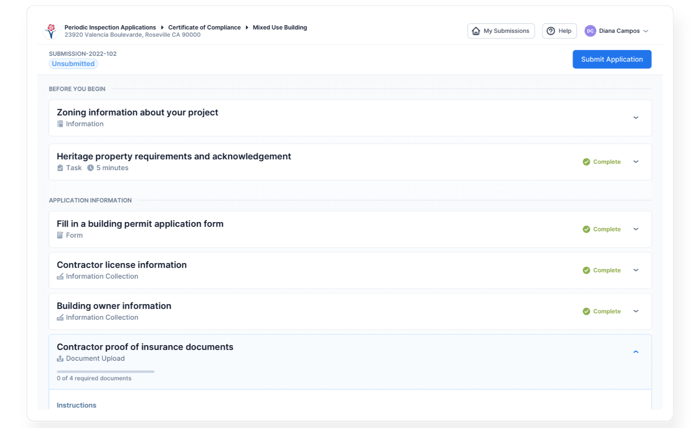
Many solutions offer an online portal that supports a completely digital permit application process. But for the majority of applicants (especially first-timers), this alone doesn’t help them understand which documents they need to submit, the rules and regulations that apply, or the steps they need to take.
For the best experience, and to reduce pre-application questions and submission errors, complement your portal with a permit guide: a tool that asks each customer unique questions and generates a manual of personalized application instructions. Used together, you can make every customer a permit application pro, even if it’s their first time.
In Placerville, CA, Chief Building Official Greg Horsfall explained that the quality of submissions “improved so much” after implementing Clariti’s pre-application permit guide, which significantly reduced the amount of time staff spent fixing errors and chasing missing documents.
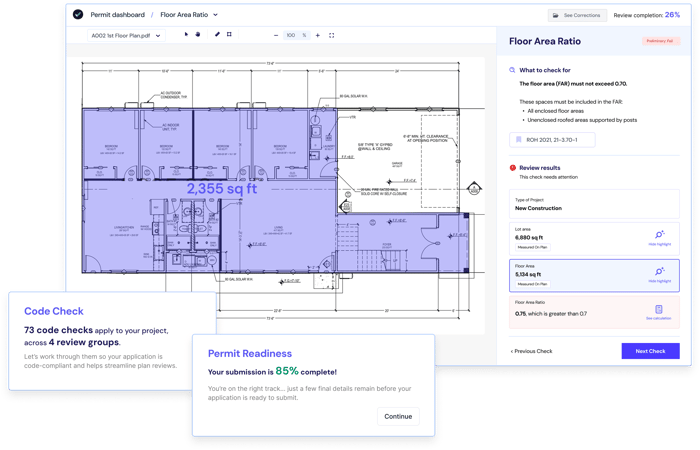
Guided AI plan review solutions like CivCheck can also significantly reduce intake cycles and review times by helping applicants submit higher-quality plans and staff complete more checks in less time. In Honolulu, CivCheck helped reduce residential review times by 70%, corrections per permit by 67%, and review cycles by 58%. See the AI Plan Review Software Buyer’s Guide for a full breakdown of what to look for.
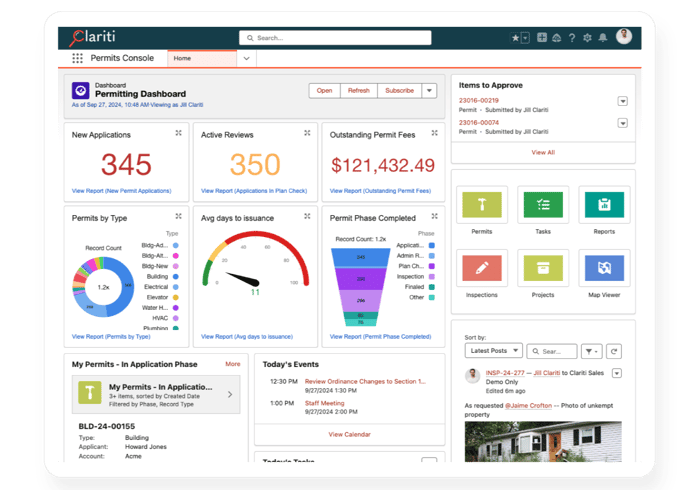
Look for platforms that let your team create reports and dashboards without IT support, using drag-and-drop tools that are easy for non-technical staff to use.
Orange County’s permitting team is a good example of what this looks like in practice. Each department has its own real-time dashboard tracking staff workload, incoming applications, KPIs, and housing numbers. Before Clariti, most reports required IT support, and at one point, the public works department needed a full-time employee dedicated to report creation.
“We can’t talk about our reports and dashboards enough. Our dashboards track everything for us including our staff workload, incoming applications, all of our KPIs and metrics, and our housing numbers.”
— Judy Kim, Permitting Manager, Orange County, CA
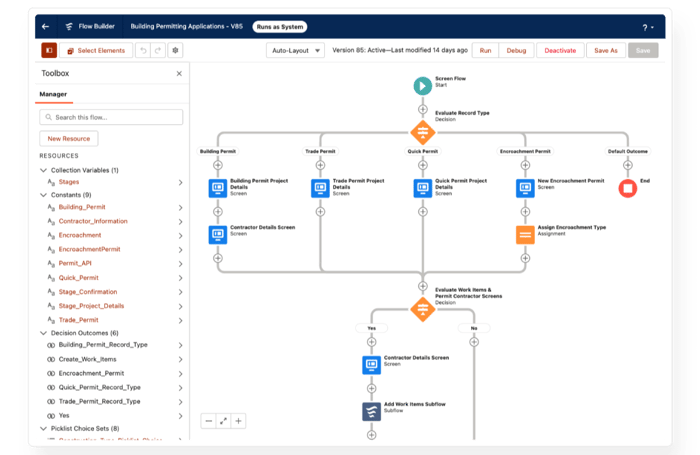
All permitting systems offer some level of process automation, but how much your team can actually do without IT or vendor support varies. With the most configurable platforms, staff can create new permit types, adjust workflows, update fee structures, and make process changes themselves — without IT involvement or change orders.
Before implementing Clariti Enterprise, Orange County’s team needed weeks — sometimes months — to push through a basic workflow change. Now their permitting manager can make changes as needed, often in just a few minutes. When California passed new ADU legislation, the public works team created a new permit type and had it live the same day.
Aspen, CO saw a similar shift. Their inspections team was spending 1.5 hours a day on manual admin work. But with Clariti’s automation, those same tasks now take 15 minutes, and 99% of inspections are completed on the day they’re requested.
Look for mobile inspection capabilities that allow your inspectors to do everything they’d do in the office from the field. Everything they can access on their office computer — assignments, daily itineraries, plans, and land parcel information — should be accessible via whatever device they use onsite, even when offline.
Everything you need to know about a project or property should be visible and accessible from one screen. You should be able to search by address or land parcel and get a full view of current and historical information: applications, statuses, inspections, complaints, violations, enforcement actions, and easily navigate between tasks and records with a click.
Your chosen permitting solution should automate the creation, tracking, and sending of everyday correspondence, such as emails, permits, violations, and public notices. Systems like Clariti Enterprise also offer automated document conversion so you can turn static PDFs into editable, reusable templates in just a few clicks. Many systems also offer prebuilt templates for common communications, all-in-one communication tracking per permit record, and visibility into whether an email was opened.
Look for comprehensive capabilities to manage and track permitting-related financial workflows end-to-end: cashiering, accounts payable, accounts receivable, subledger accounting, and online payments. You should also be able to connect to your existing financial system or ERP for data accuracy and seamless collaboration with your accounting department.
There are other helpful features outside of these core seven for different use cases, but to ensure long-term value, your chosen permitting solution should offer the above at a minimum.
The most valuable permitting software integrations include electronic plan review, GIS, online payments, email, electronic document management, and financial or ERP systems. AI plan review solutions like CivCheck are increasingly part of the stack as well. Before settling on a new system, ask your chosen vendor what managed integrations they offer and what the process would be to integrate with your existing tools.
Most vendors offer managed integrations that ensure seamless bi-directional data sharing between your permitting system and other solutions. They’re partly pre-built and tested, require minimal configuration, and allow you to centralize all of your permitting-related data in one place.
| Integration | What it does |
|---|---|
| Electronic Plan Review (Avolve, Bluebeam, ePlanSoft) | Track and complete all plan review steps within your permitting system |
| GIS (Esri ArcGIS) | View and analyze real-time GIS data alongside your permitting data to inform land use decisions |
| Payments | Pre-configured online payment integrations let customers pay for permits and services online without staff handling transactions manually |
| Email / Outlook | Centralize all email communication associated with a permit record directly in your permitting system |
| Electronic Document Management (EDMS) | Store, share, track, and manage files like building plans |
| Financial / ERP Systems | Connect permitting financials to your broader accounting infrastructure |
AI plan review software is increasingly becoming part of the common technology stack for permitting departments. CivCheck’s Guided AI Plan Review platform™ integrates with any permitting system and offers modules for AI-powered pre-check and code compliance.
Consider your long-term needs and whether your chosen solution is flexible enough to evolve with you. If a solution doesn’t have an open or public API, making future changes will either not be possible or expensive. An open API allows platforms to easily interact with each other, and gives you the flexibility to easily add new tools over time.
Permitting software delivers measurable ROI through faster permit approvals, reduced staff admin time, lower reliance on IT, and improved customer self-service, with results documented across hundreds of jurisdictions in North America. Purchasing and implementing the right permitting system will yield measurable, tangible results over the long term. It will also produce outcomes that are harder to quantify but equally important: improved resident satisfaction and a stronger reputation for responsive, accessible service.
Here are 10 of the many benefits you can expect:
| Jurisdiction | Result |
|---|---|
| Doña Ana County, NM | 50% reduction in commercial permit processing time; 42% reduction in residential processing time |
| Athens-Clarke County, GA | 2-day permit turnaround maintained even as application volumes grew |
| Orange County, CA | 10 business functions consolidated into one platform; 10-day permit turnaround year-round |
| Albany, NY | Planning review times cut by more than 50% |
| Aspen, CO | 87% reduction in inspectors’ daily admin work; 99% of inspections completed same day |
| Placerville, CA | Efficiency gains equivalent to adding a full-time staff member |
| Syracuse, NY | 3,126 hours of staff time saved in one year, totalling $93,766 in cost savings |
The time savings from permitting software come from removing friction: automated workflows instead of manual hand-offs, a single platform instead of scattered systems, and less back-and-forth over missing information.
Departments that also add AI plan review software see those gains compound. The City and County of Honolulu, for example, saw a 70% reduction in residential review times after complementing their permitting system with CivCheck.
With self-serve online portals, customers can easily access the services and information they need, 24/7/365. Whether they’re looking for information, want to apply for a permit or request an inspection, or need to pay fees or check the status of their application — they can do it all online.
“Customers don’t need to call in to figure out what’s going on.”
— Michael Carnes, System Administrator, Athens-Clarke County, GA
Adopting supportive technology that helps with productivity can significantly improve the employee experience and even help you retain and attract talent. Staff have far less repetitive, manual work and can focus on high-priority tasks like reviewing plans or conducting inspections.
“It makes everything a million times easier.”
— Ric Bennett, Field Inspector, City of Aspen, CO
All-in-one solutions give customers and staff full visibility into the permitting process. Customers can get the answers and status updates they need online, reducing calls and counter visits, and staff can see all data associated with a permit record or land parcel from one screen. All activity is tracked and visible in the system.
Highly configurable permitting systems are the best choice if you want a system that will continue to deliver value for your jurisdiction long-term. Systems like Clariti Enterprise — the most configurable permitting software in its category — allow you to easily add/change/remove workflows and processes in real time to adapt to changes in demand or regulations.
“We’ve grown a lot with Clariti over the years. We really made the system our own — the sheer flexibility is great.”
— Kathy Finholm, Financial Operations Manager, Norfolk, VA
Look for a system with drag-and-drop reporting tools and subscription settings that automatically update designated stakeholders in real time. Systems with powerful reporting capabilities like Clariti Enterprise allow you to create endless custom reports and dashboards using a simple drag-and-drop interface.
Highly configurable cloud-based systems reduce IT’s workload because security is the responsibility of the vendor, and administrators and business process analysts can set up business rules and permissions without IT support. Staff can also maintain logins, run reports, create merge documents, and make changes to processes as codes and policies change.
“Super users can make configurations on the fly to update processes and workflows as quickly as needed. And that’s with no technical background.”
— Judy Kim, Permitting Manager, Orange County, CA
All solutions offer tools and automation that help your staff do more with less, such as prebuilt templates, automated inspection assignment and scheduling, and much more. After implementing Clariti Launch, Syracuse, NY, saved 3,126 hours of staff time in one year, totalling $93,766 in cost savings.
With mobile inspection capabilities, your inspectors and code enforcement officials can take their office with them wherever they go. They can manage all inspection-related tasks from a phone, tablet, or computer, whether they’re online or offline.
More and more local governments are turning to AI tools to help address the root causes of permit delays. When evaluating permitting software vendors, make sure to ask what managed integrations are available and, specifically, what the process would be to integrate with an AI solution now or in the future.
Getting buy-in for a new permitting system requires early engagement with three key groups: elected officials, customers, and staff. Start by identifying all stakeholders, build a strong business case, and communicate clearly and often throughout the process. Getting buy-in is critical to your project’s success. If key stakeholders don’t feel heard or that their needs are met, they’re unlikely to be satisfied with the final product.

To avoid encountering roadblocks, follow these 3 proven steps to get your stakeholders on board:
Start by identifying who will be directly and indirectly impacted by the new system. A good way to do this is to ask one of your professional customers (like a developer who does a lot of business with your community) and 3-4 of your permitting staff to sit down and document every person involved in your most common permitting process. They should be able to compile a complete list of stakeholders in as little as 30 minutes.
In most cases, the three most important groups to engage early will be:
Make sure to also engage IT early. They’ll know the technical and security requirements, ask the right questions during vendor evaluations, and be instrumental partners throughout. As Retired CIO Dennis John puts it: “When IT doesn’t understand your goals, they default to no.”
Meeting with a similar-sized jurisdiction that has already implemented permitting software can also help illustrate the contrast between your current process and your envisioned future in practice.
A business case answers the ‘why’ in detail, and will likely be the most detailed document you produce throughout the life of the project aside from your RFP.
It helps to justify your project based on its expected measurable benefits, and should outline in plain language:
A well put together business case should also include:
Most importantly, make sure to avoid technical or permitting jargon so your business case can be understood by non-technical audiences, and triple-check that your assumptions and estimates don’t overstate the expected results.
Build momentum with frequent, clear communication. A reusable presentation template covering who, what, why, where, and how will serve you well for council meetings, finance questions, and onboarding new staff. Include: the purpose of the project, the problem you’re solving, expected outcomes, scope, draft schedule, and estimated budget.
A strong funding proposal for permitting software identifies the key decision-makers, quantifies the problem in terms that leadership understands, outlines expected ROI, and includes a detailed cost breakdown and project timeline. A well-put-together funding proposal clearly outlines the purpose of your project and the value it will provide. At this stage, you’re building the case for investment, not committing to a vendor. That said, having a sense of the solution type you’re targeting will help you produce realistic cost estimates.
Step 1: Identify the key decision-makers and assemble the necessary team. Include everyone who will benefit from the project.
Step 2: Put together your proposal, ensuring you include the following at a minimum:
A formal permitting software procurement process typically takes six to eighteen months and includes issuing an RFP, evaluating proposals, hosting demos, and entering a contract. Depending on your jurisdiction, faster paths — such as cooperative contracts, direct purchase, or an RFQ — may also be available. If bandwidth is a constraint and you have the budget for it, consider partnering with a technology consultant to take on the bulk of administrative work.
To help vendors provide you with the best solution at the best value, clearly explain your needs and pain points in your RFP. Before writing, answer:
Your answers will help you prioritize and clearly define your needs in your RFP, in turn ensuring that vendors address them in proposals. Just make sure you get input from staff across departments and levels to avoid leaving anything out.

If you receive a high number of proposals, consider limiting demonstrations to three vendors. That way you’ll get a good comparison of options without getting overwhelmed by choice. You also need to decide whether you want a formal demo or an informal demo — each has tradeoffs worth understanding before you choose.
| Demo type | Advantages | Disadvantages |
|---|---|---|
| Formal demo | You see the same thing from each vendor, allowing you to make an apples-to-apples comparison | No flexibility to see different things from different vendors (unless you schedule an additional demo) |
| Informal demo | More flexibility to dive into your areas of interest and ask your vendor questions as they walk you through the software | You won’t see the same thing from each vendor, which makes it harder (but not impossible) to do a fair comparison |
Either way, leave time to explore the solution in full. The most important thing to evaluate in a demo is configurability — whether your staff can make changes themselves, without code. The Plano, TX approach: every vendor faced the same test. Set up a fee schedule and modify a permit status live during the demo. Vendors who needed to get into code didn’t make the shortlist.
“A lot of vendors came in and passed the test to show us they could do what we needed. But when we said, ‘Now show us where that’s configured,’ they started getting into code. That’s when we knew.”
— Roger Wright, CIO, City of Plano, TX
A successful change management plan when implementing permitting software involves building the right internal team, communicating early and often, managing risk proactively, and staying closely engaged with your vendor throughout. A well-thought-out change management plan can go a long way in helping your staff navigate change and embrace your new system.

Here are 5 tips to build one that will help ease the transition:
Create a cross-functional team of informal leaders, problem solvers, and go-to people from every department this project will impact. Designate a project manager who will be responsible for implementing the rollout plan, keeping the momentum going, and dodging roadblocks along the way. As Plano, Texas, CIO Roger Wright explains, “The project manager coordinates across everything and has independent accountability to call balls and strikes.” Also know that you’ll need to take some high performers off the front line (at least for a short time), so plan to backfill their roles if budget and hiring bandwidth allow.
Document every risk that could delay the launch, impact adoption, or inflate costs, including staff attrition, poor internal adoption, and operational disruptions. Include mitigation actions for each.
Make sure you communicate clearly and often about your project’s progress. One of the first things you should do is share the why and the how of the new solution. How will it benefit staff? Why are you making the change? Sharing this early can reduce the likelihood that your staff will resist the change.
Celebrate achievements even if they’re small to keep team morale high, and keep everyone in the loop about any hiccups you encounter along the way.
Set up regular team meetings to assess whether updates to the software interface or application process are warranted as the project progresses.
Your vendor has helped organizations just like yours navigate change. Take advantage of their experience throughout implementation.
A successful permitting software implementation starts before the RFP is released. Plan for a 12 to 18-month timeline, invest in data preparation, establish clear goals upfront, and engage leadership early. The jurisdictions that get the most out of go-live are the ones that put in the work beforehand. You should plan for a 12 to 18-month implementation timeline (shorter for smaller jurisdictions), plus a 60-day hyper-care period after go-live.
Putting in the effort up front to prepare will pay dividends once you go live, especially for staff who’ve been using the same system for years.
As Nicki Decloux, former Principal Solutions Architect at Clariti, explained, changing permitting systems is equivalent to “walking into a room of all English speakers and saying ‘today we’re going to speak a different language.’”
Here are her 10 best practice tips to prepare for implementation and training:
There’s no such thing as an implementation going exactly to plan, but investing time upfront to prepare significantly limits the roadblocks you’ll encounter.
The best permitting software depends on your jurisdiction’s size, workflows, and the problems you most need to solve. Larger departments managing high permit volumes across multiple use cases typically need an enterprise platform with broad functionality and deep configurability. Smaller and mid-size jurisdictions often do better with a purpose-built system they can get live quickly and configure themselves without IT involvement. The right fit comes down to what your staff can own and maintain after go-live — not just what looks best in a demo.
Plan for 12 to 18 months for a full implementation depending on your organization’s size and scope, plus a 60-day hyper-care period after go-live. Scoping fewer use cases at launch can shorten timelines. Plano, Texas’ phased approach — getting key departments live first, then expanding over time — is a useful reference for what this looks like in practice. Ultimately, the effort you put into preparing for your implementation has a big impact on the quality of your outcome.
Start by quantifying your current pain in terms leadership understands: average permit processing times, weekly resubmission volumes, hours spent on manual tasks, and staff time consumed by basic reporting. Then connect those numbers to outcomes: faster approvals, reduced counter visits, lower cost per permit. Engage elected officials early. As Barb Mock, who led a large-scale permitting modernization project for Snohomish County, Washington, said: “The way to have a project crash is to not involve elected officials early on.” Peer examples help too — Doña Ana County, Albany, and Athens-Clarke County have all published specific results that finance teams and councils will find credible.
Permitting software is typically priced based on jurisdiction size, number of users, and the scope of modules you deploy. Some vendors charge per permit issued, others by annual license. Costs vary widely, so rather than chasing a specific number early in your search, ask vendors for tiered pricing ranges based on your permit volume and the use cases you want to start with. It’s also worth asking your vendor whether alternative, faster procurement options — such as cooperative contracts and buying groups — are available to you.
Functionality and cost matter, but they’re not the whole picture. Look beyond the software and evaluate vendors on: whether IT supports the platform; how responsive they are during procurement; financial stability; whether community development is their core focus; the quality of their customer references; and whether they have a structured implementation methodology. A vendor that’s hard to reach before you’ve signed is unlikely to improve after you go live.
Configurable permitting software allows staff with permissions to make system changes (new permit types, updated workflows, fee schedule adjustments, new fields) without touching source code or logging an IT ticket. It’s the difference between waiting weeks for a change order and making the update yourself in an afternoon. The Plano, TX test: ask vendors during demos to set up a fee schedule and modify a permit status live. If they need to get into code to do it, the system isn’t truly configurable.
Unlike broader government ERP platforms where permitting is one module among many, or multi-product vendors where community development sits alongside unrelated government functions, Clariti is solely focused on community development — with a suite of solutions built for local governments of all sizes. That singular focus means every product, implementation methodology, and customer support resource is built around the same use cases your department runs every day.
Clariti Enterprise and Launch are cloud-native permitting platforms designed to be configured by non-technical staff using clicks rather than code. Clariti Enterprise is built for larger organizations managing high permit volumes across multiple departments. Clariti Launch is purpose-built for small to mid-size jurisdictions that need to go live quickly without enterprise-level complexity.
Departments that want a dedicated permitting and community development partner — rather than a module within a broader platform — typically choose Clariti.
The questions that matter most go beyond feature lists:
How a vendor behaves before you sign is the clearest signal of how they’ll behave after.